<?xml version="1.0" encoding="utf-8"?><feed xmlns="http://www.w3.org/2005/Atom" ><generator uri="https://jekyllrb.com/" version="3.10.0">Jekyll</generator><link href="https://msc365.eu//feed.xml" rel="self" type="application/atom+xml" /><link href="https://msc365.eu//" rel="alternate" type="text/html" /><updated>2026-04-20T15:11:18+00:00</updated><id>https://msc365.eu//feed.xml</id><title type="html">Martin Swinkels</title><subtitle>Connecting the dots on Azure with DevOps, PowerShell, CLI, API, .NET Core, Bicep IaC and Low-code
</subtitle><author><name>Martin Swinkels</name></author><entry><title type="html">Generate secure passwords for Bicep deployments</title><link href="https://msc365.eu//azure/devops/snippets/2025/09/23/generate-secure-passwords-for-bicep-deployments.html" rel="alternate" type="text/html" title="Generate secure passwords for Bicep deployments" /><published>2025-09-23T00:00:00+00:00</published><updated>2025-09-23T00:00:00+00:00</updated><id>https://msc365.eu//azure/devops/snippets/2025/09/23/generate-secure-passwords-for-bicep-deployments</id><content type="html" xml:base="https://msc365.eu//azure/devops/snippets/2025/09/23/generate-secure-passwords-for-bicep-deployments.html"><![CDATA[<p>When deploying Azure resources that require instant secure password generation (such as <em>Virtual Machines</em>, <em>SQL Databases</em>, or <em>Key Vault Secrets</em>), it’s crucial to generate strong, random passwords programmatically. A custom PowerShell module could provide a function with secure password generation capabilities. In this post I will break down the usage of a custom PowerShell module named <code class="language-plaintext highlighter-rouge">MSc365.Idp.Toolbox</code>.</p>

<div class="important">
    <p><strong>Note</strong>: Download the <a href="https://github.com/msc365/az-idp-toolbox" target="_blank">MSc365.Idp.Toolbox</a> module on GitHub</p>
</div>

<p>While Bicep files themselves do not directly execute PowerShell, you can leverage this PowerShell module in your deployment process to generate secure passwords and pass them as parameters to your Bicep templates. Here’s how you can achieve this:</p>

<h3 id="1-import-the-powershell-module">1. Import the PowerShell module</h3>

<p>Ensure that you download the <code class="language-plaintext highlighter-rouge">MSc365.Idp.Toolbox</code> module and it is imported into your PowerShell session:</p>

<div class="language-powershell highlighter-rouge"><div class="highlight"><pre class="highlight"><code><span class="c"># Import the latest version from a specified path</span><span class="w">
</span><span class="nv">$name</span><span class="w"> </span><span class="o">=</span><span class="w"> </span><span class="s1">'MSc365.Idp.Toolbox'</span><span class="w">
</span><span class="nv">$params</span><span class="w"> </span><span class="o">=</span><span class="w"> </span><span class="p">@{</span><span class="w">
    </span><span class="nx">Name</span><span class="w">            </span><span class="o">=</span><span class="w"> </span><span class="err">(</span><span class="s1">'.\src\{0}'</span><span class="w"> </span><span class="err">-</span><span class="nx">f</span><span class="w"> </span><span class="nv">$name</span><span class="err">)</span><span class="w">
    </span><span class="nx">Force</span><span class="w">           </span><span class="o">=</span><span class="w"> </span><span class="bp">$true</span><span class="w">
</span><span class="p">}</span><span class="w">
</span><span class="n">Import-Module</span><span class="w"> </span><span class="err">@</span><span class="nx">params</span><span class="w"> </span><span class="nt">-ErrorAction</span><span class="w"> </span><span class="nx">Stop</span><span class="w">

</span><span class="c"># Verify the module is loaded</span><span class="w">
</span><span class="n">Get-Module</span><span class="w"> </span><span class="nt">-Name</span><span class="w"> </span><span class="s1">'MSc365.Idp.Toolbox'</span><span class="w">
</span></code></pre></div></div>

<h3 id="2-prepare-a-bicep-file-with-a-secure-parameter">2. Prepare a Bicep file with a Secure parameter</h3>

<p>Create (or update) a Bicep file to accept a <em>secure password parameter</em>.</p>

<p>This example demonstrates secure parameter handling in Bicep. For simplicity this template outputs the <code class="language-plaintext highlighter-rouge">adminPassword</code>, which should never be done in production environments.</p>

<pre><code class="language-bicep">// ---------- //
// PARAMETERS //
// ---------- //

@description('Required. This value should be passed.')
@secure()
param adminPassword string

// ------- //
// OUTPUTS //
// ------- //

#disable-next-line outputs-should-not-contain-secrets // Only for test purpose
output adminPassword string = adminPassword

</code></pre>

<h3 id="3-generate-a-secure-password-and-deploy-the-bicep-file">3. Generate a Secure Password and Deploy the Bicep File</h3>

<p>Create a PowerShell deployment script named <code class="language-plaintext highlighter-rouge">Deploy-WithSecurePassword.ps1</code> that uses the <code class="language-plaintext highlighter-rouge">MSc365.Idp.Toolbox</code> module to generate a secure password and then deploys the Bicep template.</p>

<div class="important">
    <p><strong>Note</strong>: Use Connect-AzAccount to login to Azure before running this script.</p>
</div>

<div class="tip">
    <p><strong>Tip</strong>: For production deployments, consider storing the generated password in Azure Key Vault for enhanced security and centralized secret management. Implementing Key Vault integration is beyond the scope of this example.</p>
</div>

<div class="language-powershell highlighter-rouge"><div class="highlight"><pre class="highlight"><code><span class="c"># Generate a default password as secure string</span><span class="w">
</span><span class="nv">$secureString</span><span class="w"> </span><span class="o">=</span><span class="w"> </span><span class="n">New-PasswordAsSecureString</span><span class="w">

</span><span class="c"># Define deployment parameters</span><span class="w">
</span><span class="nv">$params</span><span class="w"> </span><span class="o">=</span><span class="w"> </span><span class="p">@{</span><span class="w">
    </span><span class="nx">Name</span><span class="w">          </span><span class="o">=</span><span class="w"> </span><span class="s1">'dep-vmwinsecpwd-tst-123456'</span><span class="w">
    </span><span class="nx">Location</span><span class="w">      </span><span class="o">=</span><span class="w"> </span><span class="s1">'westeurope'</span><span class="w">
    </span><span class="nx">TemplateFile</span><span class="w">  </span><span class="o">=</span><span class="w"> </span><span class="s1">'main.bicep'</span><span class="w">
    </span><span class="nx">adminPassword</span><span class="w"> </span><span class="o">=</span><span class="w"> </span><span class="nv">$secureString</span><span class="w">
</span><span class="p">}</span><span class="w">

</span><span class="c"># Deploy the Bicep file with Azure PowerShell</span><span class="w">
</span><span class="nv">$deployment</span><span class="w"> </span><span class="o">=</span><span class="w"> </span><span class="n">New-AzDeployment</span><span class="w"> </span><span class="err">@</span><span class="nx">params</span><span class="w"> </span><span class="nt">-Verbose</span><span class="w">

</span><span class="c"># Optional. Check your deployment output</span><span class="w">
</span><span class="nv">$deployment</span><span class="o">.</span><span class="nf">outputs</span><span class="o">.</span><span class="nf">adminPassword</span><span class="w">
</span></code></pre></div></div>

<h3 id="4-execute-the-powershell-deployment-script">4. Execute the PowerShell Deployment Script</h3>

<p>Run the PowerShell script to deploy your Bicep file while leveraging the secure password generation from the <code class="language-plaintext highlighter-rouge">MSc365.Idp.Toolbox</code> module.</p>

<div class="language-powershell highlighter-rouge"><div class="highlight"><pre class="highlight"><code><span class="o">.</span><span class="n">\Deploy-WithSecurePassword.ps1</span><span class="w">
</span></code></pre></div></div>

<h3 id="conclusion">Conclusion</h3>

<p>This approach combines the declarative power of Bicep with the secure password generation capabilities of the <code class="language-plaintext highlighter-rouge">MSc365.Idp.Toolbox</code> PowerShell module, ensuring your Azure deployments follow security best practices with integrated secret management from the start.</p>]]></content><author><name>Martin Swinkels</name></author><category term="Azure" /><category term="DevOps" /><category term="Snippets" /><category term="azure" /><category term="iac" /><category term="powershell" /><summary type="html"><![CDATA[When deploying Azure resources that require instant secure password generation (such as Virtual Machines, SQL Databases, or Key Vault Secrets), it’s crucial to generate strong, random passwords programmatically. A custom PowerShell module could provide a function with secure password generation capabilities. In this post I will break down the usage of a custom PowerShell module named MSc365.Idp.Toolbox.]]></summary><media:thumbnail xmlns:media="http://search.yahoo.com/mrss/" url="https://msc365.eu/assets/img/post-generate-secure-passwords-for-bicep-deployments.png" /><media:content medium="image" url="https://msc365.eu/assets/img/post-generate-secure-passwords-for-bicep-deployments.png" xmlns:media="http://search.yahoo.com/mrss/" /></entry><entry><title type="html">Platform Engineering Course</title><link href="https://msc365.eu//courses/certifications/2025/09/02/course-platformengineering-practitioner.html" rel="alternate" type="text/html" title="Platform Engineering Course" /><published>2025-09-02T00:00:00+00:00</published><updated>2025-09-02T00:00:00+00:00</updated><id>https://msc365.eu//courses/certifications/2025/09/02/course-platformengineering-practitioner</id><content type="html" xml:base="https://msc365.eu//courses/certifications/2025/09/02/course-platformengineering-practitioner.html"><![CDATA[<!-- markdownlint-disable -->
<p>This week I started to join a 5-week live course to sharpen my skills in platform engineering. It’s provided by <a href="https://university.platformengineering.org/platform-engineering-certified-practitioner" target="_blank">Platform Engineering University</a> and focuses on building Internal Developer Platforms (IDPs) using proven frameworks and tools. This isn’t a passive video course. It’s hands-on, with live sessions, homework, and real-world tasks. The goal is to learn how to design and build platforms that developers actually want to use.</p>

<p><a href="https://msc365.eu/assets/img/post-platform-reference-architecture.png" target="_self"><img alt="platform engineering badge" src="https://msc365.eu/assets/img/post-platform-reference-architecture.png" width="1024" /></a></p>

<p><small>Figure 1: Internal Developer Platform (IDP) example</small></p>

<h2 id="this-course-covers">This course covers</h2>

<!-- <a href="https://msc365.eu/assets/img/post-platform-engineering-practitioner-badge.png" target="_self"><img alt="platform engineering badge" src="https://msc365.eu/assets/img/post-platform-engineering-practitioner-badge.png" width="150"/></a>

<small>Figure 2: Practitioner Badge sample</small> -->

<ul>
  <li>Intro to platform engineering</li>
  <li>How to build an Internal Developer Platform</li>
  <li>Platform tooling 101</li>
  <li>The art of building golden paths</li>
  <li>Designing golden paths for developers</li>
  <li>Finding the right abstraction(s)</li>
  <li>Infrastructure platform engineering</li>
  <li>How to build your Minimum Viable Platform (MVP)</li>
  <li>How to sell your MVP to key stakeholders</li>
</ul>

<p>There’s also a certification at the end, which helps show you understand the full scope of platform engineering, not just bits and pieces.</p>

<p>I am looking forward to applying what I learn to my work and future contracts. This course should help me design systems that scale and stay engineer and developer-friendly.</p>

<div class="tip">
    <p><strong>Tip</strong>: If you’re curious about the course or platform engineering in general, feel free to reach out. I am happy to share what I have learned.</p>
</div>

<!-- markdownlint-enable -->]]></content><author><name>Martin Swinkels</name></author><category term="Courses" /><category term="Certifications" /><category term="azure" /><category term="platform-engineering" /><summary type="html"><![CDATA[This week I started to join a 5-week live course to sharpen my skills in platform engineering. It’s provided by Platform Engineering University and focuses on building Internal Developer Platforms (IDPs) using proven frameworks and tools. This isn’t a passive video course. It’s hands-on, with live sessions, homework, and real-world tasks. The goal is to learn how to design and build platforms that developers actually want to use.]]></summary><media:thumbnail xmlns:media="http://search.yahoo.com/mrss/" url="https://msc365.eu/assets/img/post-platform-reference-architecture.png" /><media:content medium="image" url="https://msc365.eu/assets/img/post-platform-reference-architecture.png" xmlns:media="http://search.yahoo.com/mrss/" /></entry><entry><title type="html">The Campaign Forecast Power App</title><link href="https://msc365.eu//power-platform/portfolio/2025/04/18/power-apps-campaign-forecast.html" rel="alternate" type="text/html" title="The Campaign Forecast Power App" /><published>2025-04-18T00:00:00+00:00</published><updated>2025-04-18T00:00:00+00:00</updated><id>https://msc365.eu//power-platform/portfolio/2025/04/18/power-apps-campaign-forecast</id><content type="html" xml:base="https://msc365.eu//power-platform/portfolio/2025/04/18/power-apps-campaign-forecast.html"><![CDATA[<p>Recently, I had the pleasure of delivering a new <em>Power Apps solution</em> to another satisfied customer. This blog post will walk you through the key features and benefits of this custom-built application. By focusing on cost-efficiency, seamless data interaction, user-friendly low-code logic, responsive design, and independence from IT department involvement, I created a solution that not only meets but exceeds customer expectations.</p>

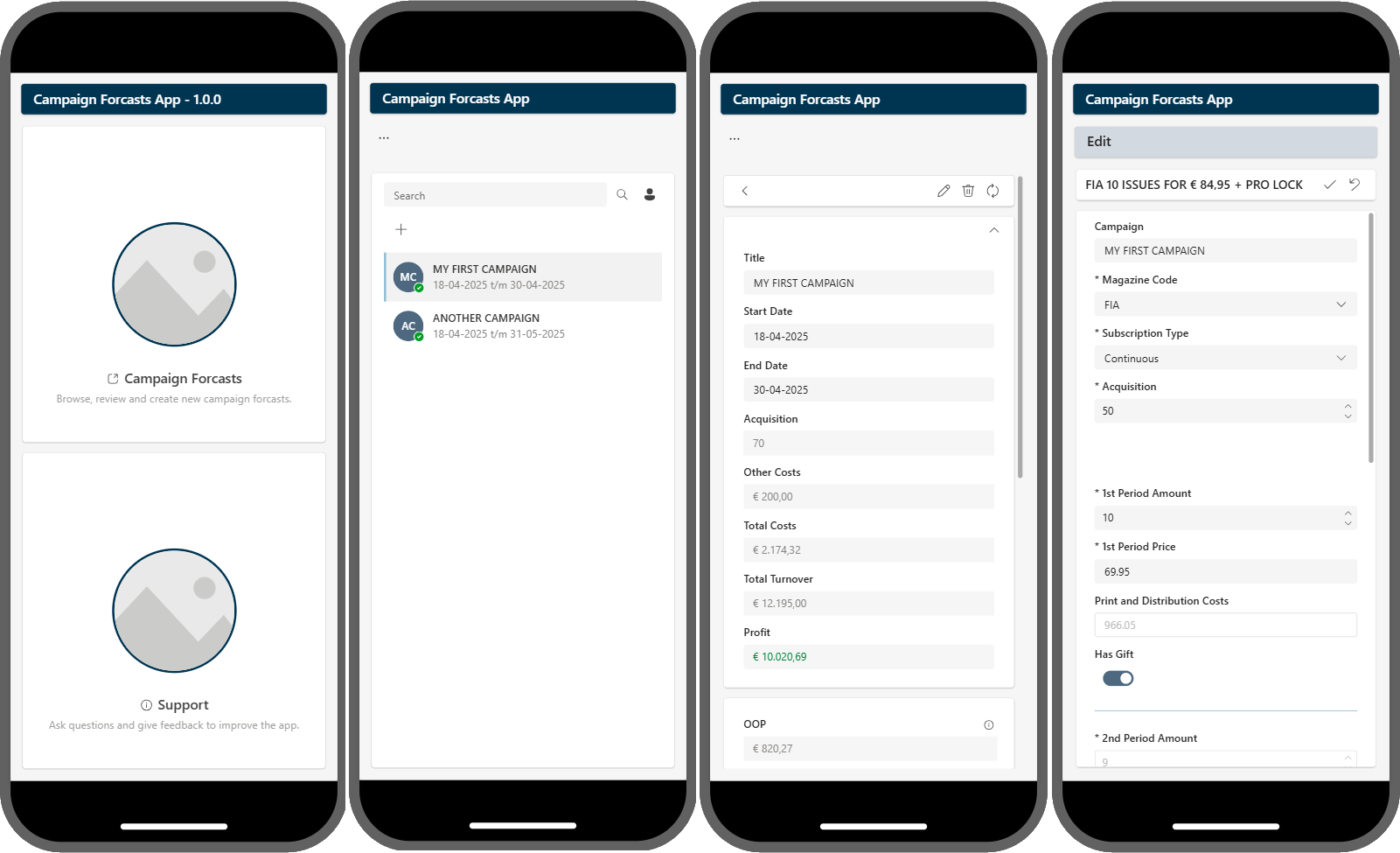
<p><a href="https://msc365.eu/assets/img/posts-rmn-cfa-scr-0.png" target="_self"><img alt="mobile ux" src="https://msc365.eu/assets/img/posts-rmn-cfa-scr-0.png" width="1024" /></a></p>

<p><small>Figure 1: Mobile UX</small></p>

<h3 id="meeting-customer-requirements">Meeting customer requirements</h3>

<p>The primary requirements for this project were clear:</p>

<ul>
  <li><strong>No extra license costs</strong></li>
  <li><strong>Data interaction without extra costs</strong></li>
  <li><strong>Low-code app logic</strong></li>
  <li><strong>Multi-device usability</strong></li>
  <li><strong>No IT department involvement</strong></li>
</ul>

<h3 id="introducing-the-campaign-forecasts-app">Introducing the Campaign Forecasts App</h3>

<p>The result was the <em>Campaign Forecasts App v1.0.0</em>, a <em>Power App</em> designed specifically to meet these requirements while providing an intuitive user experience.</p>

<h4 id="key-features">Key features</h4>

<ul>
  <li>
    <p><strong>Cost-efficiency</strong><br />
By leveraging existing Microsoft E5 licenses, we ensured that there were no additional costs involved in using this app.</p>
  </li>
  <li>
    <p><strong>Seamless data interaction</strong><br />
We utilized standard connectors available within Microsoft Power Platform to interact with SharePoint data storage efficiently without needing premium connectors.</p>
  </li>
  <li>
    <p><strong>User-friendly low-code logic</strong><br />
One of our main goals was to empower business users to take over maintenance and further development effortlessly.</p>

    <ul>
      <li>Simple drag-and-drop interfaces</li>
      <li>Easy-to-understand logic</li>
      <li>Governance and coding guidelines<br />
<span> </span></li>
    </ul>
  </li>
  <li>
    <p><strong>Responsive design</strong><br />
Understanding that modern professionals need to access tools on the go, we ensured the app is fully responsive and works seamlessly across different display sizes, including mobile phones.</p>
  </li>
  <li>
    <p><strong>Independence from IT Department</strong><br />
The app was designed with simplicity in mind, allowing business users to manage and maintain it without needing IT department involvement. This was achieved through:</p>

    <ul>
      <li>Comprehensive user guides and documentation</li>
      <li>Hands-on training to adopt the app</li>
      <li>Intuitive interface design</li>
      <li>Built-in support features</li>
    </ul>
  </li>
</ul>

<h3 id="user-experience-highlights">User experience highlights</h3>

<p>The Campaign Forecasts App offers a clean and intuitive interface. Users can easily navigate through various sections such as campaign lists, detailed campaign information, and editing interfaces. The app’s design ensures that all essential functions are accessible with minimal clicks, enhancing productivity and user satisfaction.</p>

<h3 id="conclusion">Conclusion</h3>

<p>Delivering the Campaign Forecasts App was a rewarding experience. By focusing on cost-efficiency, seamless data interaction, user-friendly low-code logic, responsive design, and independence from IT department involvement, we created a solution that not only meets but exceeds customer expectations. 
This project is a testament to the power of Microsoft Power Apps in transforming business processes and empowering users.</p>

<div class="tip">
    <p><strong>Tip</strong>: Discover how I can elevate your business productivity. Reach out today! Stay tuned for the latest updates on low-code power platform solutions.</p>
</div>

<h3 id="top-skills">Top Skills</h3>

<ul>
  <li>Low-code formulas</li>
  <li>Solution architecture</li>
  <li>Application Lifecycle Management</li>
  <li>Knowledge sharing</li>
</ul>

<h3 id="top-keywords">Top Keywords</h3>

<ul>
  <li>Power Fx</li>
  <li>Power Apps</li>
  <li>Power Automate</li>
  <li>Power Platform</li>
</ul>

<h3 id="resources">Resources</h3>

<ul>
  <li><a href="https://make.powerapps.com/">Power Apps Environment</a></li>
  <li><a href="https://make.powerautomate.com/">Power Automate Environment</a></li>
  <li><a href="https://learn.microsoft.com/en-us/power-apps/maker/canvas-apps/">Canvas apps documentation</a></li>
  <li><a href="https://learn.microsoft.com/en-us/power-apps/maker/maker-create-environment">Get your developer environment (preview)</a></li>
  <li><a href="https://learn.microsoft.com/en-us/power-platform/power-fx/formula-reference-overview">Power Fx formula reference</a></li>
  <li><a href="https://learn.microsoft.com/en-us/power-apps/guidance/coding-guidelines/code-readability">Code readability</a></li>
</ul>]]></content><author><name>Martin Swinkels</name></author><category term="Power-Platform" /><category term="Portfolio" /><category term="powerapps" /><category term="low-code" /><summary type="html"><![CDATA[Recently, I had the pleasure of delivering a new Power Apps solution to another satisfied customer. This blog post will walk you through the key features and benefits of this custom-built application. By focusing on cost-efficiency, seamless data interaction, user-friendly low-code logic, responsive design, and independence from IT department involvement, I created a solution that not only meets but exceeds customer expectations.]]></summary><media:thumbnail xmlns:media="http://search.yahoo.com/mrss/" url="https://msc365.eu/assets/img/posts-rmn-cfa-scr-0.png" /><media:content medium="image" url="https://msc365.eu/assets/img/posts-rmn-cfa-scr-0.png" xmlns:media="http://search.yahoo.com/mrss/" /></entry><entry><title type="html">Azure resource naming convention with Bicep Imports</title><link href="https://msc365.eu//azure/snippets/2025/03/20/iac-bicep-resource-naming.html" rel="alternate" type="text/html" title="Azure resource naming convention with Bicep Imports" /><published>2025-03-20T00:00:00+00:00</published><updated>2025-03-20T00:00:00+00:00</updated><id>https://msc365.eu//azure/snippets/2025/03/20/iac-bicep-resource-naming</id><content type="html" xml:base="https://msc365.eu//azure/snippets/2025/03/20/iac-bicep-resource-naming.html"><![CDATA[<p>The custom <i>user-defined functions</i> discussed in this article map <em>abbreviations</em> to both <em>resource</em> and resource <em>provider namespaces</em>. These functions adhere to the <em>abbreviation recommendations for Azure resources</em>. By following these guidelines, you can ensure consistency and clarity in your Azure resource naming conventions, which is crucial for maintaining organized and easily manageable environments.</p>

<h3 id="introduction">Introduction</h3>

<p>In the world of Azure infrastructure as code, Bicep has emerged as a powerful language for defining and deploying resources. One of the key advantages of Bicep is its ability to create reusable modules, which can significantly streamline your deployment processes. In this article, we will explore user-defined functions that you can incorporate into your custom Bicep modules to enhance their functionality and maintainability.</p>

<p>User-defined functions in Bicep allow you to encapsulate logic that can be reused across multiple modules. This not only reduces redundancy but also ensures consistency in your deployments. Here we explore some custom functions that you might find useful:</p>

<h3 id="resource-abbreviation-functions">Resource Abbreviation functions</h3>

<p>The custom <em>resource abbreviation</em> functions in this article are designed to map <em>abbreviations</em> (e.g.: <code class="language-plaintext highlighter-rouge">rg</code>, <code class="language-plaintext highlighter-rouge">vm</code>, <code class="language-plaintext highlighter-rouge">vmss</code>) to <em>resource</em> and resource <em>provider namespaces</em>. This is particularly useful for maintaining clarity and consistency in your resource naming conventions.</p>

<h3 id="examples">Examples</h3>
<p>Let’s take a look at an example of user-defined functions that you could include in your Bicep modules:</p>

<p>The user-defined function itself. (For clarity, only the <code class="language-plaintext highlighter-rouge">getManagementAndGovernanceAbbr</code> function is shown.)</p>

<pre><code class="language-bicep">// Management and Governance
@export()
@description('Returns the abbreviation recommendation for Azure management and 
              governance resources.')
@metadata({
  example: 'getManagementAndGovernanceAbbr("Resources/resourceGroups")'
  input: 'The provider name space without the `Microsoft` part due to template size 
          limitations e.g.: Resources/resourceGroups'
})
func getManagementAndGovernanceAbbr(providerNameSpace string) string =&gt;
  {
    'AlertsManagement/actionRules': 'apr'
    'Automation/automationAccounts': 'aa'
    'Authorization/policyDefinitions': '&lt;descriptive&gt;'
    'Blueprint/blueprints': 'bp'
    'Blueprint/blueprints/artifacts': 'bpa'
    'Insights/actionGroups': 'ag'
    'Insights/components': 'appi'
    'Insights/dataCollectionEndpoints': 'dce'
    'Insights/dataCollectionRules': 'dcr'
    'Management/managementGroups': 'mg'
    'OperationalInsights/querypacks': 'pack'
    'OperationalInsights/workspaces': 'log'
    'Purview/accounts': 'pview'
    'Resources/resourceGroups': 'rg'
    'Resources/resourceGroups/subscriptions': 'sub'
    'Resources/templateSpecs': 'ts'
  }[providerNameSpace]
</code></pre>

<p>Usage example in a <code class="language-plaintext highlighter-rouge">.bicep</code> file.</p>

<pre><code class="language-bicep">metadata name = 'Import all user-defined functions'
metadata description = '''
This example imports all available user-defined functions of the given module.
Note: In your module you would import only the functions you need.
'''
metadata owner = 'platform-engineers'

// -------------- //
// TEST EXECUTION //
// -------------- //

import {
  getAIAndMachineLearningAbbr
  getAnalyticsAndIoTAbbr
  getComputeAndWebAbbr
  getContainerAbbr
  getDatabaseAbbr
  getDeveloperToolsAbbr
  getDevOpsAbbr
  getIntegrationAbbr
  getManagementAndGovernanceAbbr
  getMigrationAbbr
  getNetworkAbbr
  getSecurityAbbr
  getStorageAbbr
  getVirtualDesktopInfraAbbr
} from '../../../main.bicep'

// Common parameters
param ResourceName string = '${ResourceGroupsAbbr}-example-dev-weu'
output ResourceNameOutput string = ResourceName

// Management and governance
param ResourceGroupsAbbr string = getManagementAndGovernanceAbbr('Resources/resourceGroups')
output ResourceGroupsAbbrOutput string = ResourceGroupsAbbr
</code></pre>

<p><br /></p>

<p>Usage example in a <code class="language-plaintext highlighter-rouge">.bicepparam</code> file.</p>

<div class="tip">
    <p><strong>Tip</strong>: A user-defined function in a <b>bicepparam</b> file is evaluated during design-time. This offers an advantage over using it in a <b>bicep</b> file, where the function becomes part of the actual ARM build file. This could pose a potential problem when your template is used as a nested module within a <i>foreach</i> loop, as it will add the function to the ARM build file for each iteration of the loop.</p>
</div>

<pre><code class="language-bicep">metadata description = '''
This example imports only the functions you need.
Note: In your module you would import only the functions you need.
'''

using none

import {
  getManagementAndGovernanceAbbr
} from '../../../main.bicep'

param ResourceName string = '${ResourceGroupsAbbr}-example-dev-weu'

// Management and governance
param ResourceGroupsAbbr = getManagementAndGovernanceAbbr('Resources/resourceGroups')
</code></pre>

<p><br /></p>

<p>Usage example in a <code class="language-plaintext highlighter-rouge">.JSON</code> parameter file.</p>

<div class="tip">
    <p><strong>Tip</strong>: If you want to test this function without going through the deployment process, you can use <b>Build parameter file</b> by right-clicking on the <i>.bicepparam</i> file. This will output the results in a parameter <i>JSON</i> file like the following example:</p>
</div>

<div class="language-json highlighter-rouge"><div class="highlight"><pre class="highlight"><code><span class="p">{</span><span class="w">
  </span><span class="nl">"$schema"</span><span class="p">:</span><span class="w"> </span><span class="s2">"https://schema.management.azure.com/schemas/
              2019-04-01/deploymentParameters.json#"</span><span class="p">,</span><span class="w">
  </span><span class="nl">"contentVersion"</span><span class="p">:</span><span class="w"> </span><span class="s2">"1.0.0.0"</span><span class="p">,</span><span class="w">
  </span><span class="nl">"parameters"</span><span class="p">:</span><span class="w"> </span><span class="p">{</span><span class="w">
    </span><span class="nl">"ResourceName"</span><span class="p">:</span><span class="w"> </span><span class="p">{</span><span class="w">
      </span><span class="nl">"value"</span><span class="p">:</span><span class="w"> </span><span class="s2">"rg-example-dev-weu"</span><span class="w">
    </span><span class="p">},</span><span class="w">
    </span><span class="nl">"ResourceGroupsAbbr"</span><span class="p">:</span><span class="w"> </span><span class="p">{</span><span class="w">
      </span><span class="nl">"value"</span><span class="p">:</span><span class="w"> </span><span class="s2">"rg"</span><span class="w">
    </span><span class="p">}</span><span class="w">
  </span><span class="p">}</span><span class="w">
</span><span class="p">}</span><span class="w">
</span></code></pre></div></div>

<h3 id="conclusion">Conclusion</h3>

<p>By incorporating user-defined functions into your custom Bicep modules, you can enhance the readability, maintainability, and consistency of your Azure deployments. Whether you’re mapping resource abbreviations or defining reusable logic, these functions will help you achieve a more streamlined and efficient infrastructure as code experience.</p>

<h3 id="resources">Resources</h3>

<ul>
  <li><a href="https://learn.microsoft.com/en-us/azure/cloud-adoption-framework/ready/azure-best-practices/resource-abbreviations" target="_blank">Azure Abbreviations</a></li>
  <li><a href="https://learn.microsoft.com/en-us/azure/azure-resource-manager/bicep/parameters" target="_blank">Parameter in Bicep</a></li>
  <li><a href="https://learn.microsoft.com/en-us/azure/azure-resource-manager/bicep/bicep-import" target="_blank">Imports in Bicep</a></li>
</ul>]]></content><author><name>Martin Swinkels</name></author><category term="Azure" /><category term="Snippets" /><category term="automation" /><category term="azure" /><category term="bicep" /><category term="iac" /><summary type="html"><![CDATA[The custom user-defined functions discussed in this article map abbreviations to both resource and resource provider namespaces. These functions adhere to the abbreviation recommendations for Azure resources. By following these guidelines, you can ensure consistency and clarity in your Azure resource naming conventions, which is crucial for maintaining organized and easily manageable environments.]]></summary></entry><entry><title type="html">How to validate management group diagnostic settings?</title><link href="https://msc365.eu//azure/devops/snippets/2024/11/03/azure-iac-posh-management-group-diagnostic-settings.html" rel="alternate" type="text/html" title="How to validate management group diagnostic settings?" /><published>2024-11-03T00:00:00+00:00</published><updated>2024-11-03T00:00:00+00:00</updated><id>https://msc365.eu//azure/devops/snippets/2024/11/03/azure-iac-posh-management-group-diagnostic-settings</id><content type="html" xml:base="https://msc365.eu//azure/devops/snippets/2024/11/03/azure-iac-posh-management-group-diagnostic-settings.html"><![CDATA[<p>Currently there is not a direct way to validate if <code class="language-plaintext highlighter-rouge">Diagnostic Settings</code> is enabled to a <code class="language-plaintext highlighter-rouge">Management Group</code> in the <em>Azure Portal</em>, <em>Azure CLI</em> or <em>PowerShell</em>. For anyone who needs to check or smoke test a deployment, I wrote the following PowerShell function that will make a REST API call using PowerShell.</p>

<blockquote>
  <p><strong>Note</strong>: Use <code class="language-plaintext highlighter-rouge">Connect-AzAccount</code> to login to Azure before running this script.</p>
</blockquote>

<p>To validate if <code class="language-plaintext highlighter-rouge">Diagnostic Settings</code> was correctly enabled for any specific management group, the following snippet (REST API GET call) can be used.</p>

<div class="language-powershell highlighter-rouge"><div class="highlight"><pre class="highlight"><code><span class="cm">&lt;#
</span><span class="cs">.SYNOPSIS</span><span class="cm">
    Get the diagnostic settings for a management group.

</span><span class="cs">.DESCRIPTION</span><span class="cm">
    Gets the active management group diagnostic settings for the specified resource.

</span><span class="cs">.PARAMETER</span><span class="cm"> ManagementGroupId
    Mandatory. The management group id.

</span><span class="cs">.PARAMETER</span><span class="cm"> DiagnosticSettingName
    Mandatory. The diagnostic setting name.

</span><span class="cs">.NOTES</span><span class="cm">
    Use Connect-AzAccount to login to Azure before running this script.

</span><span class="cs">.EXAMPLE</span><span class="cm">
    .\Get-ManagementGroupDiagnosticSettings.ps1 `
        -ManagementGroupId 'mg-msc-intermediate-sbx' `
        -DiagnosticSettingName 'tolaws'
#&gt;</span><span class="w">
</span><span class="p">[</span><span class="n">CmdletBinding</span><span class="p">()]</span><span class="w">
</span><span class="kr">param</span><span class="w"> </span><span class="p">(</span><span class="w">
    </span><span class="p">[</span><span class="n">Parameter</span><span class="p">(</span><span class="n">Mandatory</span><span class="w"> </span><span class="o">=</span><span class="w"> </span><span class="bp">$true</span><span class="p">)]</span><span class="w">
    </span><span class="p">[</span><span class="n">string</span><span class="p">]</span><span class="w"> </span><span class="nv">$ManagementGroupId</span><span class="p">,</span><span class="w">

    </span><span class="p">[</span><span class="n">Parameter</span><span class="p">(</span><span class="n">Mandatory</span><span class="w"> </span><span class="o">=</span><span class="w"> </span><span class="bp">$true</span><span class="p">)]</span><span class="w">
    </span><span class="p">[</span><span class="n">string</span><span class="p">]</span><span class="w"> </span><span class="nv">$DiagnosticSettingName</span><span class="w">
</span><span class="p">)</span><span class="w">

</span><span class="kr">begin</span><span class="w"> </span><span class="p">{</span><span class="w">
    </span><span class="n">Write-Debug</span><span class="w"> </span><span class="p">(</span><span class="s1">'{0} entered'</span><span class="w"> </span><span class="nt">-f</span><span class="w"> </span><span class="bp">$MyInvocation</span><span class="o">.</span><span class="nf">MyCommand</span><span class="p">)</span><span class="w">

    </span><span class="nv">$token</span><span class="w"> </span><span class="o">=</span><span class="w"> </span><span class="p">(</span><span class="n">Get-AzAccessToken</span><span class="p">)</span><span class="o">.</span><span class="nf">Token</span><span class="w">
    </span><span class="nv">$accessToken</span><span class="w"> </span><span class="o">=</span><span class="w"> </span><span class="s1">'Bearer {0}'</span><span class="w"> </span><span class="nt">-f</span><span class="w"> </span><span class="nv">$token</span><span class="w">
</span><span class="p">}</span><span class="w">

</span><span class="kr">process</span><span class="w"> </span><span class="p">{</span><span class="w">
    </span><span class="kr">try</span><span class="w"> </span><span class="p">{</span><span class="w">

        </span><span class="nv">$uriFormat</span><span class="w"> </span><span class="o">=</span><span class="w"> </span><span class="s1">'https://management.azure.com/providers/microsoft.management/'</span><span class="w"> </span><span class="o">+</span><span class="w">
            </span><span class="s1">'managementGroups/{0}/providers/microsoft.insights/'</span><span class="w"> </span><span class="o">+</span><span class="w">
            </span><span class="s1">'diagnosticSettings/{1}?api-version=2020-01-01-preview'</span><span class="w">

        </span><span class="nv">$uri</span><span class="w"> </span><span class="o">=</span><span class="w"> </span><span class="p">(</span><span class="nv">$uriFormat</span><span class="w"> </span><span class="nt">-f</span><span class="w">
            </span><span class="p">[</span><span class="n">uri</span><span class="p">]::</span><span class="n">EscapeDataString</span><span class="p">(</span><span class="nv">$ManagementGroupId</span><span class="p">),</span><span class="w">
            </span><span class="p">[</span><span class="n">uri</span><span class="p">]::</span><span class="n">EscapeDataString</span><span class="p">(</span><span class="nv">$DiagnosticSettingName</span><span class="p">))</span><span class="w">

        </span><span class="nv">$methodInput</span><span class="w"> </span><span class="o">=</span><span class="w"> </span><span class="p">@{</span><span class="w">
            </span><span class="nx">Method</span><span class="w">  </span><span class="o">=</span><span class="w"> </span><span class="s1">'GET'</span><span class="w">
            </span><span class="nx">Uri</span><span class="w">     </span><span class="o">=</span><span class="w"> </span><span class="nv">$uri</span><span class="w">
            </span><span class="nx">Headers</span><span class="w"> </span><span class="o">=</span><span class="w"> </span><span class="p">@{</span><span class="w">
                </span><span class="s1">'Accept'</span><span class="w">        </span><span class="o">=</span><span class="w"> </span><span class="s1">'application/json'</span><span class="w">
                </span><span class="s1">'Authorization'</span><span class="w"> </span><span class="o">=</span><span class="w"> </span><span class="nv">$accessToken</span><span class="w">
            </span><span class="p">}</span><span class="w">
        </span><span class="p">}</span><span class="w">

        </span><span class="nv">$response</span><span class="w"> </span><span class="o">=</span><span class="w"> </span><span class="n">Invoke-RestMethod</span><span class="w"> </span><span class="err">@</span><span class="nx">methodInput</span><span class="w">
        </span><span class="kr">return</span><span class="w"> </span><span class="nv">$response</span><span class="w">

    </span><span class="p">}</span><span class="w"> </span><span class="kr">catch</span><span class="w"> </span><span class="p">{</span><span class="w">
        </span><span class="kr">if</span><span class="w"> </span><span class="p">(</span><span class="bp">$_</span><span class="o">.</span><span class="nf">Exception</span><span class="o">.</span><span class="nf">Response</span><span class="o">.</span><span class="nf">StatusCode</span><span class="w"> </span><span class="o">-eq</span><span class="w"> </span><span class="s1">'NotFound'</span><span class="p">)</span><span class="w"> </span><span class="p">{</span><span class="w">
            </span><span class="n">Write-Error</span><span class="w"> </span><span class="p">(</span><span class="bp">$_</span><span class="o">.</span><span class="nf">Exception</span><span class="o">.</span><span class="nf">Message</span><span class="p">)</span><span class="w">
            </span><span class="kr">return</span><span class="w">
        </span><span class="p">}</span><span class="w"> </span><span class="kr">else</span><span class="w"> </span><span class="p">{</span><span class="w">
            </span><span class="kr">throw</span><span class="w"> </span><span class="bp">$_</span><span class="w">
        </span><span class="p">}</span><span class="w">
    </span><span class="p">}</span><span class="w">
</span><span class="p">}</span><span class="w">

</span><span class="kr">end</span><span class="w"> </span><span class="p">{</span><span class="w">
    </span><span class="n">Write-Debug</span><span class="w"> </span><span class="p">(</span><span class="s1">'{0} exited'</span><span class="w"> </span><span class="nt">-f</span><span class="w"> </span><span class="bp">$MyInvocation</span><span class="o">.</span><span class="nf">MyCommand</span><span class="p">)</span><span class="w">
</span><span class="p">}</span><span class="w">

</span></code></pre></div></div>

<!-- omit from toc -->
<h3 id="resources">Resources</h3>

<ul>
  <li><a href="https://learn.microsoft.com/en-us/powershell/module/az.accounts/get-azaccesstoken" target="_blank">Get-AzAccessToken</a></li>
  <li><a href="https://learn.microsoft.com/en-us/powershell/module/microsoft.powershell.utility/invoke-restmethod" target="_blank">Invoke-RestMethod</a></li>
  <li><a href="https://learn.microsoft.com/rest/api/monitor/management-group-diagnostic-settings/get" target="_blank">Management Group Diagnostic Settings - GET</a></li>
</ul>]]></content><author><name>Martin Swinkels</name></author><category term="Azure" /><category term="DevOps" /><category term="Snippets" /><category term="azure" /><category term="iac" /><category term="powershell" /><summary type="html"><![CDATA[Currently there is not a direct way to validate if Diagnostic Settings is enabled to a Management Group in the Azure Portal, Azure CLI or PowerShell. For anyone who needs to check or smoke test a deployment, I wrote the following PowerShell function that will make a REST API call using PowerShell.]]></summary></entry><entry><title type="html">Improve and redesign Business App solution</title><link href="https://msc365.eu//power-platform/devops/portfolio/2024/04/01/assignment-power-app-cma.html" rel="alternate" type="text/html" title="Improve and redesign Business App solution" /><published>2024-04-01T00:00:00+00:00</published><updated>2024-04-01T00:00:00+00:00</updated><id>https://msc365.eu//power-platform/devops/portfolio/2024/04/01/assignment-power-app-cma</id><content type="html" xml:base="https://msc365.eu//power-platform/devops/portfolio/2024/04/01/assignment-power-app-cma.html"><![CDATA[<p>I would like to announce that I have been awarded an exciting new opportunity and that I will be delivering the following key services:</p>

<h3 id="deliverables">Deliverables</h3>

<ul>
  <li>
    <p><strong>Support and Maintenance</strong><br />
Ensuring the smooth operation and reliability of an existing business solution.</p>
  </li>
  <li>
    <p><strong>Minor Application Enhancements and System Integrations</strong><br />
Implementing small but impactful improvements and seamless integrations to enhance overall functionality.</p>
  </li>
  <li>
    <p><strong>Redesign for Performance and UX</strong><br />
Revamping current application to boost performance and provide an improved user experience.</p>
  </li>
  <li>
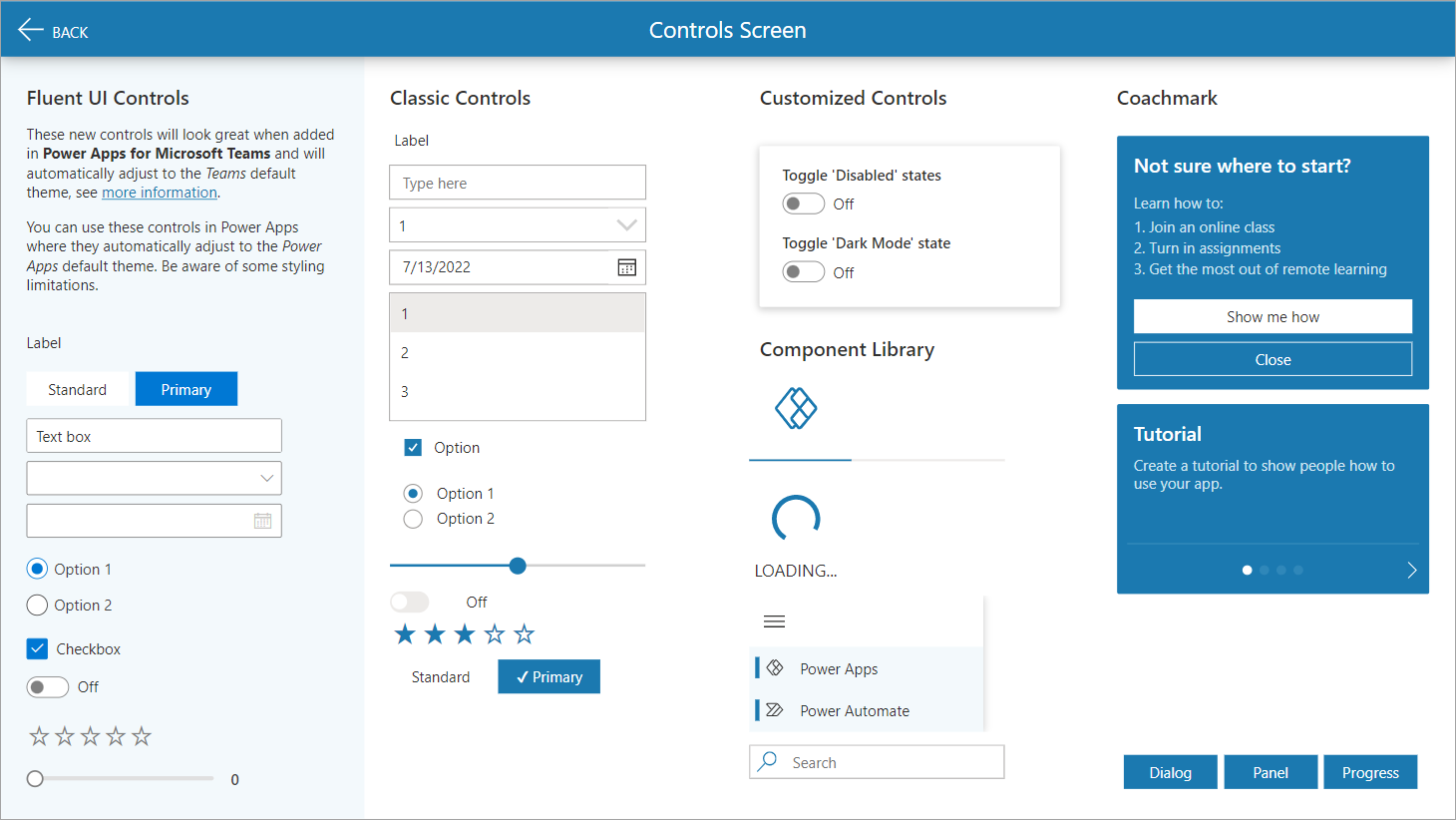
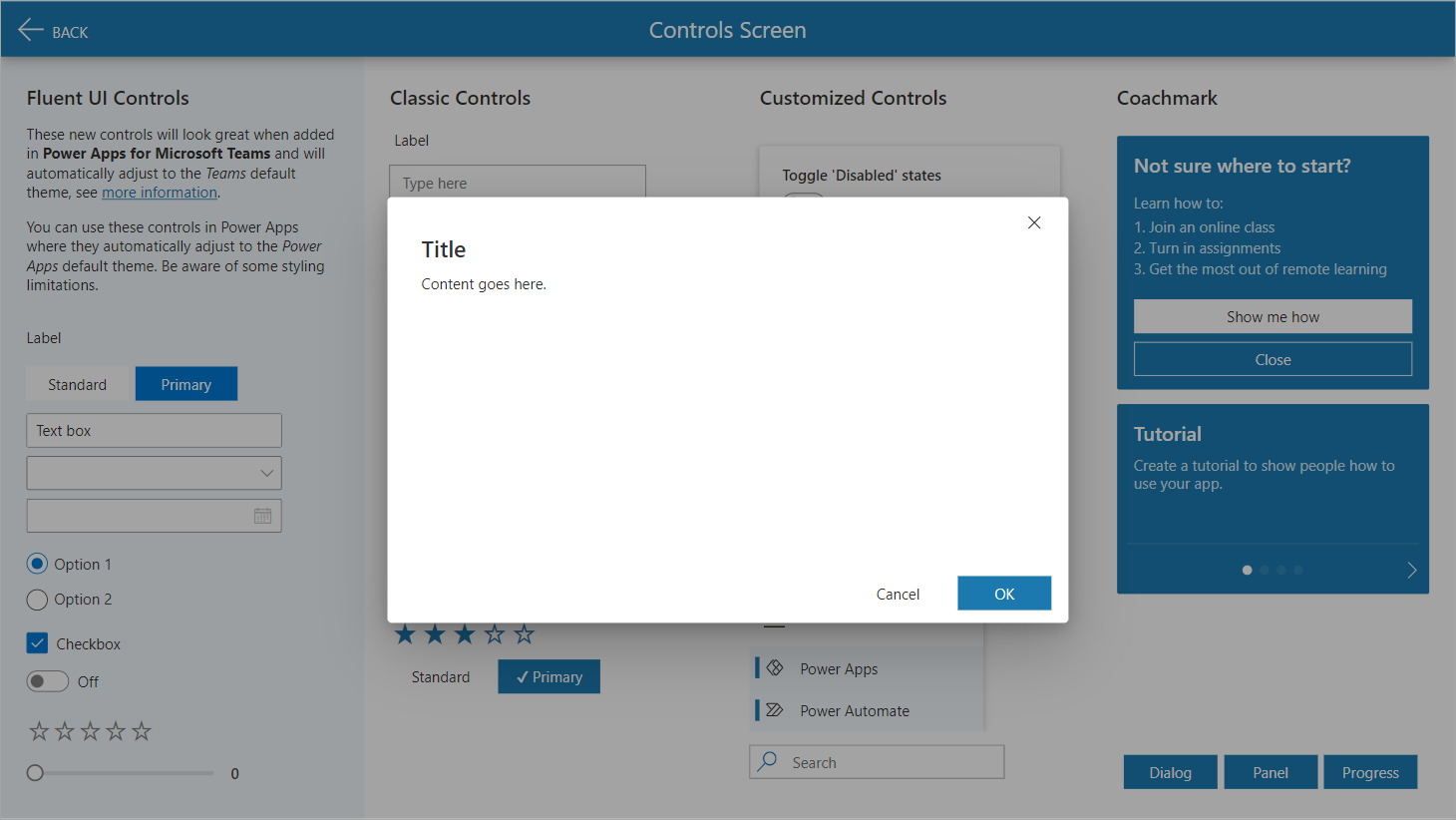
    <p><strong>Modern Controls and Themes in Canvas Apps</strong><br />
Introducing contemporary controls and themes to elevate the look and feel of the canvas app.</p>
  </li>
  <li>
    <p><strong>Redesigned Power App and Power Automate Solution</strong><br />
Overhauling existing solutions to leverage the full potential of Power Apps and Power Automate.</p>
  </li>
</ul>

<p>I am excited to embark on this journey and look forward to delivering exceptional results!</p>

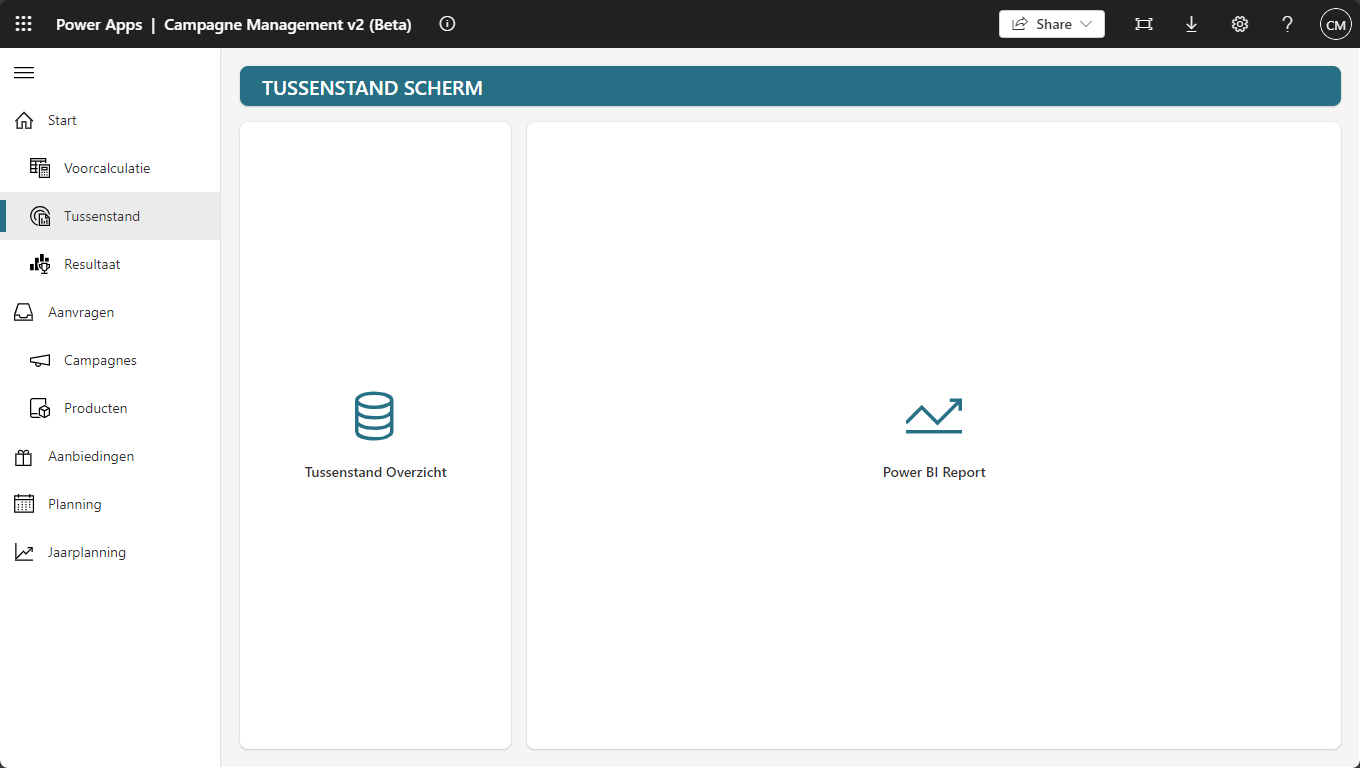
<h3 id="redesign-improved-ux">Redesign improved UX</h3>

<p><a href="https://msc365.eu/assets/img/posts-powerplatform-conceptual-redesign-campmgmt-ux.png" target="_self"><img alt="redesign ux" src="https://msc365.eu/assets/img/posts-powerplatform-conceptual-redesign-campmgmt-ux.png" width="1024" /></a></p>

<p><small>Figure 1: Conceptual redesign for an improved user experience</small></p>

<h3 id="top-skills">Top Skills</h3>

<ul>
  <li>Power Apps</li>
  <li>Power Automate</li>
  <li>Power FX (Low-code)</li>
  <li>Custom Connectors</li>
  <li>Component Library</li>
  <li>Software Architecture</li>
</ul>

<h3 id="top-keywords">Top Keywords</h3>

<ul>
  <li>SQL (Azure SQL Database)</li>
  <li>Entra ID App Registration</li>
  <li>ALM (Application Lifecycle Management)</li>
</ul>]]></content><author><name>Martin Swinkels</name></author><category term="Power-Platform" /><category term="DevOps" /><category term="Portfolio" /><category term="powerapps" /><category term="powerautomate" /><category term="component" /><category term="library" /><category term="low-code" /><category term="alm" /><summary type="html"><![CDATA[I would like to announce that I have been awarded an exciting new opportunity and that I will be delivering the following key services:]]></summary><media:thumbnail xmlns:media="http://search.yahoo.com/mrss/" url="https://msc365.eu/assets/img/posts-powerplatform-conceptual-redesign-campmgmt-ux.png" /><media:content medium="image" url="https://msc365.eu/assets/img/posts-powerplatform-conceptual-redesign-campmgmt-ux.png" xmlns:media="http://search.yahoo.com/mrss/" /></entry><entry><title type="html">Developing IaC for ISV Landing Zones</title><link href="https://msc365.eu//azure/devops/portfolio/2024/02/01/assignment-isv-landingzones.html" rel="alternate" type="text/html" title="Developing IaC for ISV Landing Zones" /><published>2024-02-01T00:00:00+00:00</published><updated>2024-02-01T00:00:00+00:00</updated><id>https://msc365.eu//azure/devops/portfolio/2024/02/01/assignment-isv-landingzones</id><content type="html" xml:base="https://msc365.eu//azure/devops/portfolio/2024/02/01/assignment-isv-landingzones.html"><![CDATA[<p>I am immensely proud to announce that a Microsoft ISV (Independent Software Vendor) in the Netherlands awarded me a hiring contract to deliver business value and share my knowledge with the internal Microsoft Azure team.</p>

<p>Looking forward to collaborating with the Microsoft Azure team for the next year to create meaningful Azure Multi-tenant SaaS solutions and secure deployments with accelerators for; Azure ISV Landing Zones and SaaS workloads like; Certificate Authority, Security Operations Center and Microsoft 365 Automation (DSC). I will also support the team to transform into an infrastructure as code organization using Bicep, PowerShell, and Azure DevOps CI/CD Pipelines.</p>

<h3 id="deliverables">Deliverables</h3>

<ul>
  <li>
    <p><strong>Infrastructure as Code for a Multi-tenant Azure platform and Landing Zone SaaS solutions</strong><br />
Implementing Infrastructure as Code (IaC) to efficiently manage and provision a scalable, secure, and compliant multi-tenant Azure environment. This includes setting up Landing Zones tailored for SaaS solutions to ensure optimal performance and governance.</p>
  </li>
  <li>
    <p><strong>Deployment acceleration using Bicep IaC, CI/CD Pipelines, and PowerShell</strong><br />
Utilizing Bicep for IaC, along with Continuous Integration/Continuous Deployment (CI/CD) pipelines and PowerShell scripting, to streamline and expedite the deployment process. This approach reduces manual intervention, minimizes errors, and accelerates time-to-market.</p>
  </li>
  <li>
    <p><strong>Team training and ongoing support to ensure success with DevOps practices</strong><br />
Providing comprehensive training sessions and continuous support to teams, enabling them to adopt and excel in DevOps practices. This ensures that the team is well-equipped to handle the complexities of modern development and operations workflows.</p>
  </li>
  <li>
    <p><strong>Self-serviced Azure DevOps automation for setting up new SaaS projects</strong><br />
Developing automated, self-service solutions within Azure DevOps to facilitate the quick and efficient setup of new SaaS projects. This empowers teams to initiate projects independently, reducing dependency on centralized IT resources and speeding up project initiation.</p>
  </li>
</ul>

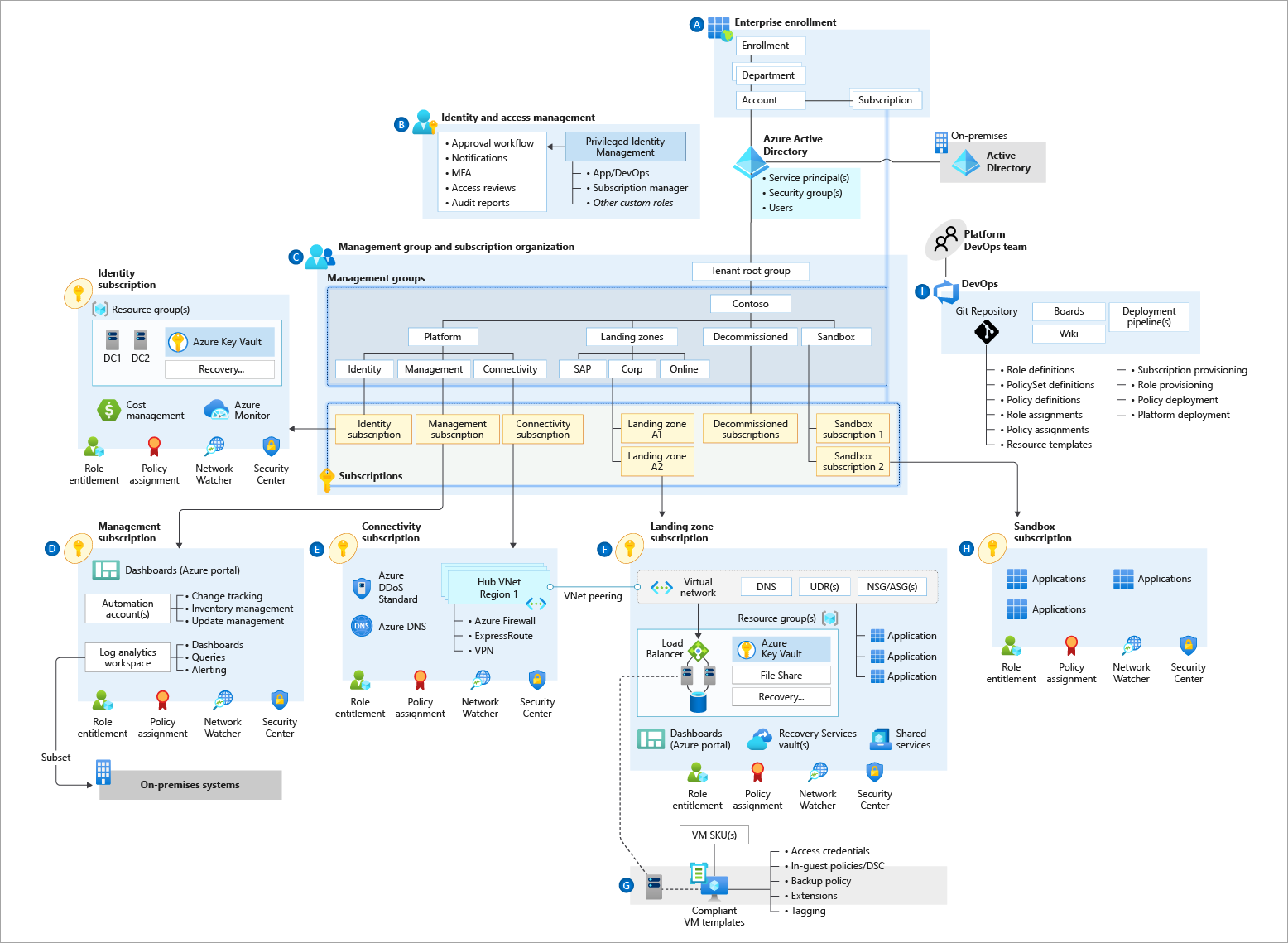
<h3 id="azure-landing-zone-architecture">Azure Landing zone architecture</h3>

<p><a href="https://learn.microsoft.com/en-us/azure/cloud-adoption-framework/ready/landing-zone/" target="_blank"><img alt="lz preview" src="https://msc365.eu/assets/img/posts-az-landingzones-conceptual-architecture.png" width="1024" /></a></p>

<p><small>Figure 1: Azure landing zone conceptual architecture</small></p>

<h3 id="top-skills">Top Skills</h3>

<ul>
  <li>Azure DevOps</li>
  <li>Azure Development</li>
  <li>IaC (Infrastructure as code)</li>
  <li>Application Lifecycle Management</li>
</ul>

<h3 id="top-keywords">Top Keywords</h3>

<ul>
  <li>ALZ (Azure Landing Zones)</li>
  <li>AVM (Azure Verified Modules)</li>
  <li>CAF (Microsoft Cloud Adoption Framework)</li>
  <li>WAF (Microsoft Azure Well-Architected Framework)</li>
</ul>]]></content><author><name>Martin Swinkels</name></author><category term="Azure" /><category term="DevOps" /><category term="Portfolio" /><category term="azure" /><category term="azure-devops" /><category term="iac" /><category term="bicep" /><category term="powershell" /><category term="yaml" /><summary type="html"><![CDATA[I am immensely proud to announce that a Microsoft ISV (Independent Software Vendor) in the Netherlands awarded me a hiring contract to deliver business value and share my knowledge with the internal Microsoft Azure team.]]></summary><media:thumbnail xmlns:media="http://search.yahoo.com/mrss/" url="https://msc365.eu/assets/img/posts-az-landingzones-conceptual-architecture.png" /><media:content medium="image" url="https://msc365.eu/assets/img/posts-az-landingzones-conceptual-architecture.png" xmlns:media="http://search.yahoo.com/mrss/" /></entry><entry><title type="html">Transforming to an IaC organization</title><link href="https://msc365.eu//azure/devops/portfolio/2023/02/02/assignment-iac-transformation.html" rel="alternate" type="text/html" title="Transforming to an IaC organization" /><published>2023-02-02T00:00:00+00:00</published><updated>2023-02-02T00:00:00+00:00</updated><id>https://msc365.eu//azure/devops/portfolio/2023/02/02/assignment-iac-transformation</id><content type="html" xml:base="https://msc365.eu//azure/devops/portfolio/2023/02/02/assignment-iac-transformation.html"><![CDATA[<p>I’m excited to announce that I have secured <em>my first assignment</em> as a freelancer! Together with the Architecture &amp; Development team, we will be transforming the organization’s way of working by implementing Infrastructure as Code (IaC) using Bicep. This collaborative effort will replace their current PowerShell-based method for deploying resources to Azure, fostering teamwork and shared success.</p>

<h3 id="deliverables">Deliverables</h3>

<ul>
  <li>
    <p><strong>Simplified Syntax</strong><br />
Deliver a more concise and readable syntax with Bicep, replacing the often verbose and complex scripts in PowerShell.</p>
  </li>
  <li>
    <p><strong>Modularity</strong><br />
Provide modular templates through Bicep, making it easier to manage and reuse code across different projects.</p>
  </li>
  <li>
    <p><strong>Better Integration</strong><br />
Ensure better integration and support for Azure Resource Manager (ARM) templates by using Bicep, which is designed specifically for Azure.</p>
  </li>
  <li>
    <p><strong>Error Handling</strong><br />
Implement improved error handling and validation with Bicep, reducing the chances of deployment failures.</p>
  </li>
  <li>
    <p><strong>Tooling Support</strong><br />
Enhance the development experience with robust tooling support, including Visual Studio Code extensions that offer features like IntelliSense and syntax highlighting.</p>
  </li>
  <li>
    <p><strong>Declarative Approach</strong><br />
Adopt a declarative approach with Bicep, making it easier to understand and manage the desired state of the infrastructure without needing to write imperative scripts.</p>
  </li>
</ul>

<h3 id="team-adoption">Team Adoption</h3>

<ul>
  <li>
    <p><strong>Training Sessions</strong><br />
Conduct training sessions to familiarize engineers with Bicep syntax and best practices.</p>
  </li>
  <li>
    <p><strong>Documentation</strong><br />
Provide comprehensive documentation and examples to help engineers understand how to use Bicep effectively.</p>
  </li>
  <li>
    <p><strong>Pilot Projects</strong><br />
Start with pilot projects to allow engineers to gain hands-on experience with Bicep in a controlled environment.</p>
  </li>
  <li>
    <p><strong>Mentorship</strong><br />
Establish a mentorship program where experienced Bicep users can support and guide new adopters.</p>
  </li>
  <li>
    <p><strong>Feedback Loop</strong><br />
Create a feedback loop to gather input from engineers and continuously improve the adoption process.</p>
  </li>
  <li>
    <p><strong>Incentives</strong><br />
Offer incentives or recognition for engineers who successfully adopt and utilize Bicep in their projects.</p>
  </li>
</ul>

<h3 id="top-skills">Top Skills</h3>

<ul>
  <li>Azure CLI</li>
  <li>Azure DevOps</li>
  <li>PowerShell (Modules)</li>
  <li>IaC (Infrastructure as code)</li>
  <li>Application Lifecycle Management</li>
  <li>Knowledge sharing</li>
</ul>

<h3 id="top-keywords">Top Keywords</h3>

<ul>
  <li>CAF (Microsoft Cloud Adoption Framework)</li>
  <li>ARM (Azure Resource Manager)</li>
  <li>CARML (Common Azure Resource Module Library)</li>
</ul>]]></content><author><name>Martin Swinkels</name></author><category term="Azure" /><category term="DevOps" /><category term="Portfolio" /><category term="azure" /><category term="azure-devops" /><category term="iac" /><category term="bicep" /><category term="powershell" /><category term="yaml" /><summary type="html"><![CDATA[I’m excited to announce that I have secured my first assignment as a freelancer! Together with the Architecture &amp; Development team, we will be transforming the organization’s way of working by implementing Infrastructure as Code (IaC) using Bicep. This collaborative effort will replace their current PowerShell-based method for deploying resources to Azure, fostering teamwork and shared success.]]></summary></entry><entry><title type="html">Microsoft Intune Plugin</title><link href="https://msc365.eu//azure/portfolio/2022/11/25/microsoft-intune-plugin.html" rel="alternate" type="text/html" title="Microsoft Intune Plugin" /><published>2022-11-25T00:00:00+00:00</published><updated>2022-11-25T00:00:00+00:00</updated><id>https://msc365.eu//azure/portfolio/2022/11/25/microsoft-intune-plugin</id><content type="html" xml:base="https://msc365.eu//azure/portfolio/2022/11/25/microsoft-intune-plugin.html"><![CDATA[<p>For this project I worked together in a team to redesign the way EAM was build and operating. My primary role was to create new ideas on how to develop a more robust, resilient and self-serviced solution. The main purpose for the Endpoint Application Management (EAM) plugin is to fill the gap between deploying applications from Microsoft Intune and keeping them up to date.</p>

<h3 id="meet-customer-requirements">Meet customer requirements</h3>

<p>The new plugin for endpoint application management should become more robust, resilient and self-serviced. The following areas were defined for improvements:</p>

<ul>
  <li>
    <p><strong>Maintainability and manageability​</strong><br />
Version 1.0 was hard to manage with up to 150+ pipelines, technical limitations, and it was hard to onboard new customers​ because of platform boundaries.</p>
  </li>
  <li>
    <p><strong>Team collaboration on PowerShell code</strong>​<br />
There were large PowerShell scripts with a lot of embedded functions, no code testing, no code conventions​, which was really hard for team collaboration.</p>
  </li>
  <li>
    <p><strong>Troubleshooting​</strong><br />
There were too many processes, no insights available and no alert mechanism​, which made it hard to troubleshoot.</p>
  </li>
  <li>
    <p><strong>Customer interactions</strong><br />
An Azure DevOps pipeline approval step, for approving a deployment to production devices, was done by an internal Customer Landscape Owner (CLO)​, and was not accessible for external users.</p>
  </li>
  <li>
    <p><strong>Ops adoption</strong>​<br />
All customer and application configurations were stored in 1 XML-file, which was hard to adopt by operations, mistakes were easily made or were not noticed.</p>
  </li>
</ul>

<h3 id="features">Features</h3>

<p>To provide Microsoft Intune as a service you need to manually:</p>

<ul>
  <li>Create application packages</li>
  <li>Manage package versions for pilot and production</li>
  <li>Publish packages from pilot to production​</li>
  <li>Check for new application versions and recreate packages
​- Manage software inventory groups​</li>
  <li>Manage already installed software on end points for pilot and production</li>
</ul>

<p>The EAM 1.0 plugin, automated all of these processes.</p>

<h3 id="delivery">Delivery</h3>

<div class="note">
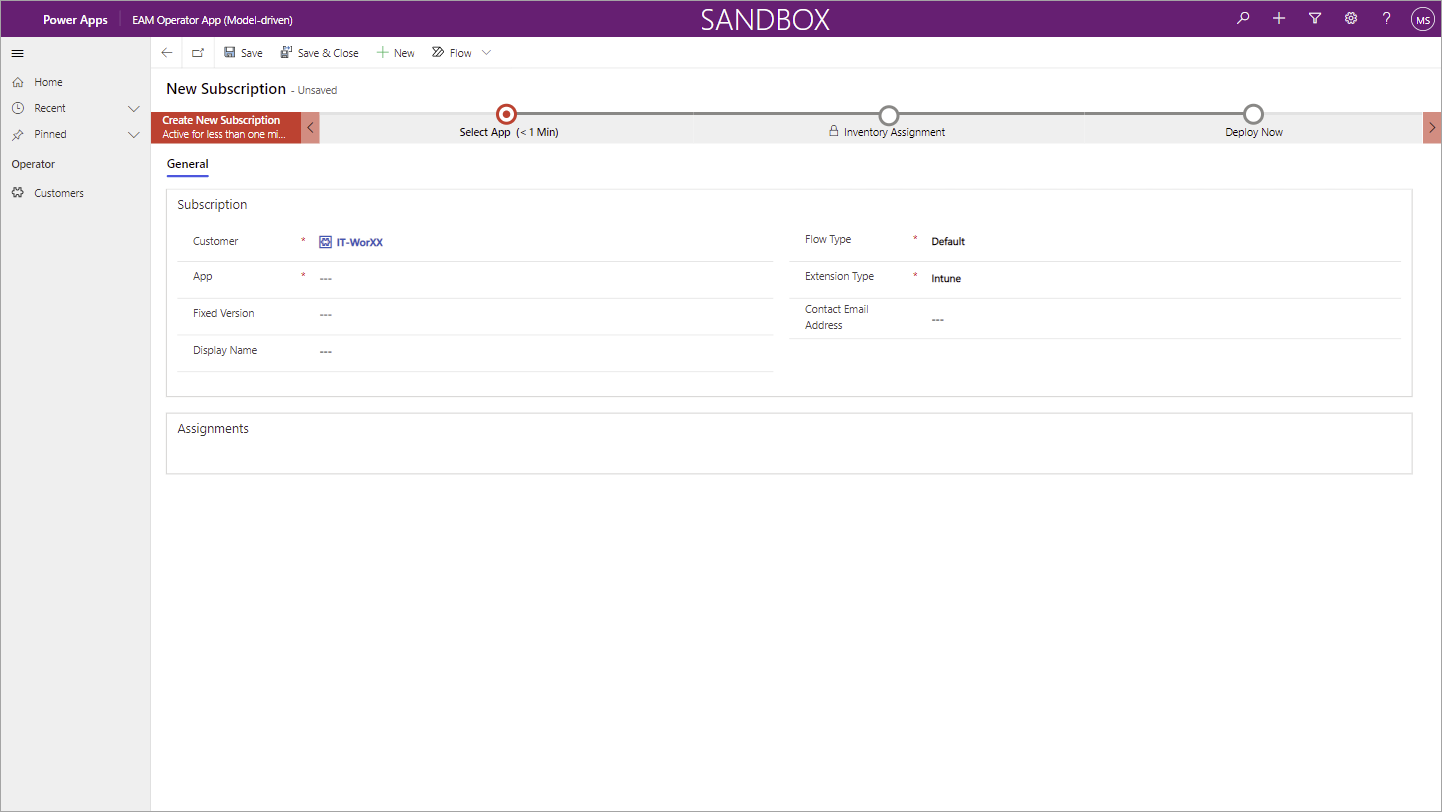
    <p><strong>Note</strong>: The team adopted an Azure DevOps way-of-working during this project, which turned out to be a success story and opened up the transformation to an Azure DevOps way-of-working for other teams as well.</p>
</div>

<p>The team delivered the following improvements:</p>

<ul>
  <li>
    <p><strong>PowerShell Modules</strong>​<br />
I developed a new PowerShell Module template with embedded Pester tests and coding guidelines. All scrips were reviewed, optimized and migrated into reusable and distributable PowerShell modules​, ready to publish as Azure Artifacts.</p>

    <p><a href="https://msc365.eu/assets/img/posts-intune-plugin-build-status-badges.png" target="_self"><img alt="Build status badges" src="https://msc365.eu/assets/img/posts-intune-plugin-build-status-badges.png" width="1024" /></a></p>

    <p><small>Build status badges on Azure DevOps</small></p>
  </li>
  <li>
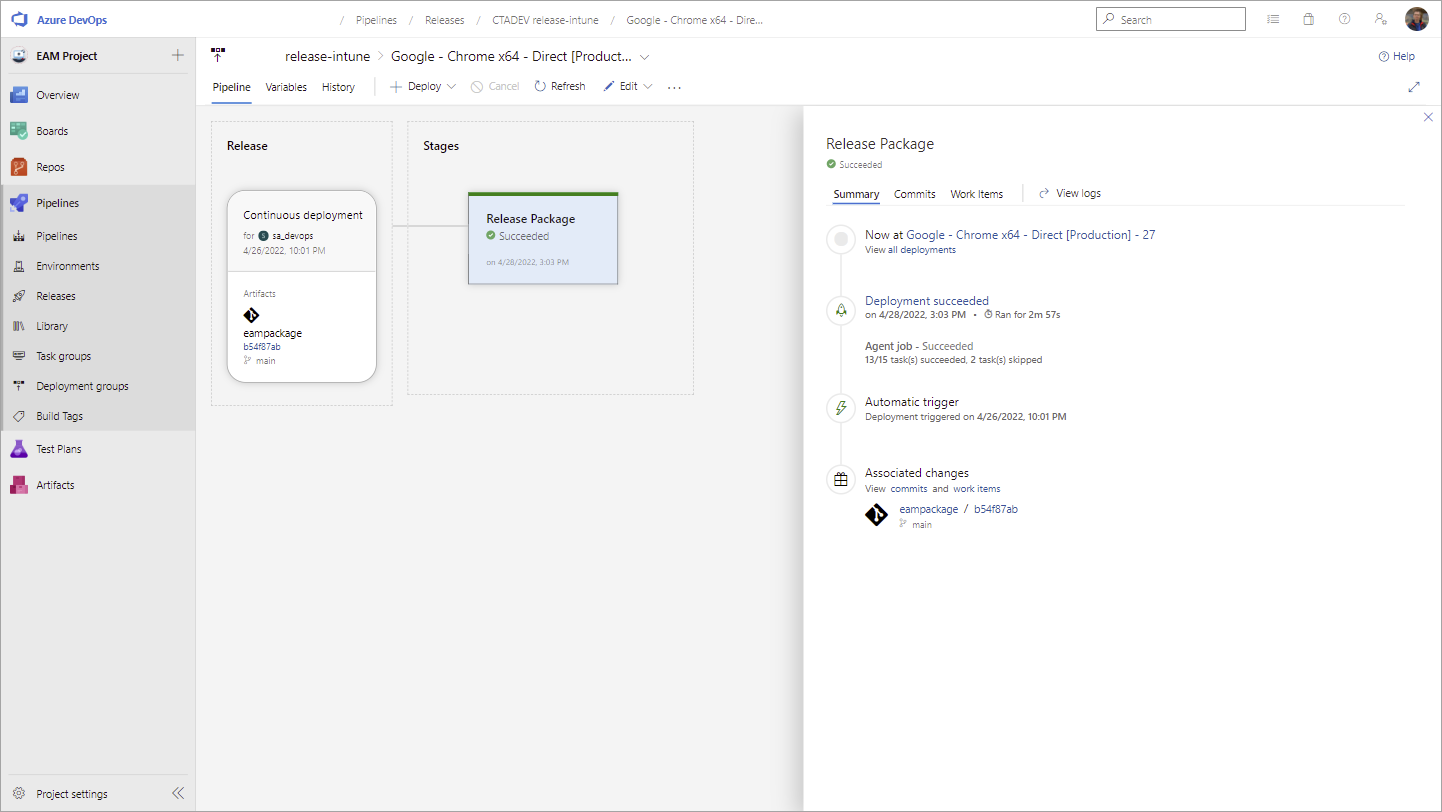
    <p><strong>Maintainable Azure DevOps Pipelines</strong>​<br />
We implemented CI/CD to build, test and deploy the PowerShell modules as Azure artifacts​. We also reduced the number of pipelines to only 1 pipeline for the entire process, and 1 pipeline per customer.</p>
  </li>
  <li>
    <p><strong>Azure Automation</strong>​<br />
We configured Azure Runbooks and Azure DevOps repositories to use the latest PowerShell modules​, to run the automated download and package process.</p>

    <p><a href="https://msc365.eu/assets/img/posts-intune-plugin-ado-release-pipeline.png" target="_self"><img alt="Release pipeline" src="https://msc365.eu/assets/img/posts-intune-plugin-ado-release-pipeline.png" width="1024" /></a></p>

    <p><small>Release pipeline on Azure DevOps</small></p>
  </li>
  <li>
    <p><strong>Microsoft Dataverse</strong>​<br />
We replaced the XML configuration file with a structured and managed database, and used with triggers to run Power Automate flows and integrate with Intune and DevOps APIs.</p>
  </li>
  <li>
    <p><strong>Microsoft Power Platform</strong>​<br />
I developed an model-driven ‘Operator’ app, a customer accessible approval workflow with Power Automate, and deployed it as a solution to different staged environments (best practice Application Lifecycle Management).</p>

    <p><a href="https://msc365.eu/assets/img/posts-intune-plugin-model-driven-app.png" target="_self"><img alt="Model-driven app" src="https://msc365.eu/assets/img/posts-intune-plugin-model-driven-app.png" width="1024" /></a></p>

    <p><small>Model-driven app on Microsoft Power Platform</small></p>
  </li>
</ul>

<h3 id="tools-and-technologies">Tools and technologies</h3>

<ul>
  <li>Microsoft Intune</li>
  <li>Azure Runbooks, Logic Apps, Blob Storage, Key Vault, Web Applications, and Kubernetes Services</li>
  <li>Dataverse REST APIs, DevOps REST APIs, and Intune REST APIs</li>
  <li>Azure DevOps Boards, Repos, Pipelines, Artifacts, Wiki, and Custom Agents</li>
  <li>Microsoft Power Platform, Power Apps, Power Automate, Dataverse, ALM Solutions, Business Process Flows (BPF)</li>
  <li>Microsoft PowerShell</li>
</ul>

<h3 id="third-party-resources">Third-party resources</h3>

<ul>
  <li><a href="https://www.powershellgallery.com/packages/Evergreen">Evergreen</a><br />
Evergreen is a PowerShell module that retrieves the latest version numbers and download URLs for various software products directly from the vendor source.</li>
</ul>]]></content><author><name>Martin Swinkels</name></author><category term="Azure" /><category term="Portfolio" /><category term="azure" /><category term="powershell" /><category term="powerapps" /><category term="powerautomate" /><summary type="html"><![CDATA[For this project I worked together in a team to redesign the way EAM was build and operating. My primary role was to create new ideas on how to develop a more robust, resilient and self-serviced solution. The main purpose for the Endpoint Application Management (EAM) plugin is to fill the gap between deploying applications from Microsoft Intune and keeping them up to date.]]></summary><media:thumbnail xmlns:media="http://search.yahoo.com/mrss/" url="https://msc365.eu/assets/img/posts-intune-plugin-ado-release-pipeline.png" /><media:content medium="image" url="https://msc365.eu/assets/img/posts-intune-plugin-ado-release-pipeline.png" xmlns:media="http://search.yahoo.com/mrss/" /></entry><entry><title type="html">Azure DevOps Wiki Export Utility</title><link href="https://msc365.eu//devops/portfolio/2022/11/23/azure-devops-wiki-export-utility.html" rel="alternate" type="text/html" title="Azure DevOps Wiki Export Utility" /><published>2022-11-23T00:00:00+00:00</published><updated>2022-11-23T00:00:00+00:00</updated><id>https://msc365.eu//devops/portfolio/2022/11/23/azure-devops-wiki-export-utility</id><content type="html" xml:base="https://msc365.eu//devops/portfolio/2022/11/23/azure-devops-wiki-export-utility.html"><![CDATA[<p>For a customer project I enhanced a community developed tool, to publish an Azure DevOps Wiki outside Azure DevOps for team members such as Stakeholders, who do not have access to code repositories. This utility converts an Azure DevOps Wiki to a PDF file, publishes it on SharePoint Online with a CI/CD pipeline, and makes it available through Microsoft Teams.</p>

<div class="important">
    <p><strong>Important</strong>: Stakeholder access is available to support free access to a limited set of features by an unlimited set of stakeholders. In general, Stakeholder access users gain limited access to Azure Boards, Azure Pipelines, and collaboration tools. They have no access to code repositories.</p>
    <p>More information: <a href="https://docs.microsoft.com/en-us/azure/devops/organizations/security/stakeholder-access?view=azure-devops" target="_blank">Azure DevOps</a></p>
</div>

<p><br /></p>

<p><a href="https://msc365.eu/assets/img/posts-wiki-export-utility-preview.png" target="_self"><img alt="Utility preview" src="https://msc365.eu/assets/img/posts-wiki-export-utility-preview.png" width="1024" /></a></p>

<p><small>PDF preview</small></p>

<p>The tool can be used on a Windows x64 machine as executable or as downloadable artifact in an Azure DevOps pipeline, which allows you to implement a CI/CD process to publish your documentation.</p>

<p><a href="https://msc365.eu/assets/img/posts-wiki-export-utility-pipeline.png" target="_self"><img alt="Utility pipeline preview" src="https://msc365.eu/assets/img/posts-wiki-export-utility-pipeline.png" width="1024" /></a></p>

<p><small>Pipeline preview</small></p>

<h3 id="features">Features</h3>

<p>Currently this utility supports:</p>

<ul>
  <li>Conversion of all wiki (sub) pages based on .order file(s)</li>
  <li>Default wiki styles and formatting</li>
  <li>Pictures with remote and relative URLs</li>
  <li>Page bookmarks for easier PDF navigation</li>
  <li>Hyperlinks to other wiki pages</li>
  <li>Azure DevOps <a href="https://docs.microsoft.com/en-us/azure/devops/project/wiki/markdown-guidance?view=azure-devops">Markdown syntax</a></li>
  <li>Emojis</li>
  <li>Mermaid Diagrams</li>
  <li>Mathematical notation and characters</li>
  <li>Telemetry with Application Insights</li>
</ul>

<p>It is self-contained; members can download the .exe file, set arguments, run, done!</p>

<h3 id="requirements">Requirements</h3>

<p>The utility is developed as a .NET 5.0 console application and requires the runtime to be installed. Currently it requires the x64 runtime.</p>

<h3 id="telemetry">Telemetry</h3>

<p>The utility uses Application Insights for basic telemetry:</p>

<ul>
  <li>The duration of the export and the count of wiki pages will be submitted.</li>
  <li>In case of an error, the exception is submitted.</li>
  <li>No wiki content is or will be submitted.</li>
</ul>

<h3 id="tools-and-technologies">Tools and technologies</h3>

<ul>
  <li>Microsoft .NET 5.0</li>
  <li>Microsoft PowerShell</li>
  <li>Microsoft Graph API</li>
  <li>Azure DevOps (CI/CD, Build Pipelines, Source Control)</li>
</ul>

<h3 id="third-party-resources">Third-party resources</h3>

<p>This utility is a wrapper, originally created by <a href="https://github.com/MaxMelcher">Max Mecher</a> (version 3.3.0), which uses open source libraries that do the actual work.</p>

<ul>
  <li><a href="https://github.com/commandlineparser/commandline">CommandLineParser</a> – 2.8.0</li>
  <li><a href="https://github.com/konzen/DinkToPdf">DinkToPdf.Standard</a> – 1.1.0</li>
  <li><a href="https://github.com/lunet-io/markdig/">Markdig</a> – 0.26.0</li>
  <li><a href="https://github.com/hardkoded/puppeteer-sharp">PuppeteerSharp</a> – 5.0.0</li>
</ul>]]></content><author><name>Martin Swinkels</name></author><category term="DevOps" /><category term="Portfolio" /><category term="azure" /><category term="azure-devops" /><category term="yaml" /><category term="dotnet" /><category term="sharepoint" /><summary type="html"><![CDATA[For a customer project I enhanced a community developed tool, to publish an Azure DevOps Wiki outside Azure DevOps for team members such as Stakeholders, who do not have access to code repositories. This utility converts an Azure DevOps Wiki to a PDF file, publishes it on SharePoint Online with a CI/CD pipeline, and makes it available through Microsoft Teams.]]></summary><media:thumbnail xmlns:media="http://search.yahoo.com/mrss/" url="https://msc365.eu/assets/img/posts-wiki-export-utility-pipeline.png" /><media:content medium="image" url="https://msc365.eu/assets/img/posts-wiki-export-utility-pipeline.png" xmlns:media="http://search.yahoo.com/mrss/" /></entry></feed>